Safe Switch is a new function in BSNeBiz system that serves as a self-service security measure which enables your organisation to safeguard the organisation’s BSNeBiz account against suspicious or unauthorized transactions.
The BSNeBiz Safe Switch function helps to protect your funds from online scams and enhances the security of online banking.
This security feature is accessible via web or mobile application by the organisation’s user whereby the BSNeBiz system will remove the organisation’s user from the session and suspend all the user’s accesses to the organization’s account.
BENEFITS OF BSNeBiz SAFE SWITCH
- Protect your organization’s funds immediately if you suspect that you have been scammed, or your organization’s account has been compromised.
- Prevent unauthorized transactions as online scammers will not be able to access your BSNeBiz Banking.
- Enhance your organization's online banking security feature as reactivation will require a strict identity verification process by BSN Contact Centre.
- Having control over your organization's finances while enabling self-service security through BSNeBiz.
STEPS TO USE BSNeBiz SAFE SWITCH
Visit BSNeBiz website.

Log in to www.bsnebiz.com.my.
Log in to www.bsnebiz.com.my.

Click ‘Safe Switch’ on the left navigation.
Click ‘Safe Switch’ on the left navigation.

Input required remarks (if required) and click ‘Next’ button.
Input required remarks (if required) and click ‘Next’ button.

Verify details and click ‘Confirm’ to proceed to deactivate or suspend your organization’s BSNeBiz Banking access.
Verify details and click ‘Confirm’ to proceed to deactivate or suspend your organization’s BSNeBiz Banking access.
Log in to www.bsnebiz.com.my.
Log in to www.bsnebiz.com.my.
Click ‘Safe Switch’ on the left navigation.
Click ‘Safe Switch’ on the left navigation.
Input required remarks (if required) and click ‘Next’ button.
Input required remarks (if required) and click ‘Next’ button.
Verify details and click ‘Confirm’ to proceed to deactivate or suspend your organization’s BSNeBiz Banking access.
Verify details and click ‘Confirm’ to proceed to deactivate or suspend your organization’s BSNeBiz Banking access.
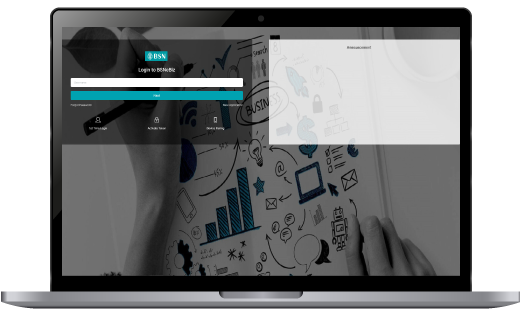
STEP 1
Log in to www.bsnebiz.com.my.
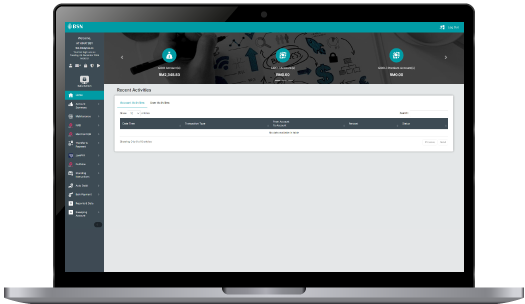
STEP 2
Click ‘Safe Switch’ on the left navigation.
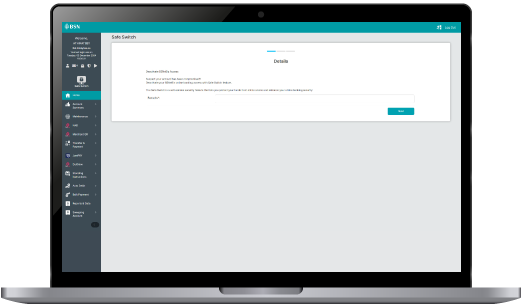
STEP 3
Input required remarks (if required) and click ‘Next’ button.
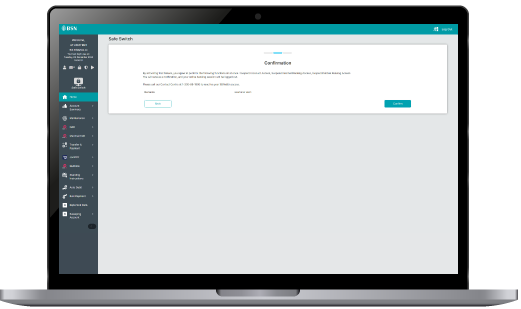
STEP 4
Verify details and click ‘Confirm’ to proceed to deactivate or suspend your organization’s BSNeBiz Banking access.
NOTE:
- Note: BSNeBiz System will automatically remove user logged out from all active sessions immediately and display logout screen.
HOW TO REACTIVATE ACCOUNT ACCESS?
To release the suspension of or reactivate your organization’s BSNeBiz account access, please call BSN Contact Centre at 03-2613 1900.
frequently asked questions (faq)
Immediately deactivate access to the BSNeBiz account using the BSNeBiz Safe Switch to protect your organization’s BSNeBiz account. Next, immediately call BSN Contact Centre at 03-2613 1900 to make a report.
Immediately call BSN Contact Centre at 03-2613 1900 once you suspected your access to the BSNeBiz account or the username and/or password of your organisation’s BSNeBiz has been stolen.
To reactivate the access to your organisation’s BSNeBiz account, please call BSN Contact Centre at 03-2613 1900.
You may access or use your organisation’s BSNeBiz account using the same Username and Password immediately after the reactivation subject to successful verification by BSN Contact Centre.
Your funds will remain secured in your organization’s BSNeBiz account. Nevertheless, we encourage you to reactivate the BSNeBiz access by contacting BSN Contact Centre at 03-2613 1900.
Updating your OS gives you the latest security updates to help protect your device from cyber threats when using the BSNeBiz Mobile App.
Effective 1 October 2025, customers must update their OS version as follows to continue using BSNeBiz Mobile App:
- iOS: version 15 and above
- Android: version 11 and above
- EMUI: version 12.0.1 and above
Older OS versions will no longer support the app.
Frequently Asked Questions (FAQ) – Operating System (OS) for BSNeBiz Mobile App
You will no longer be able to use BSNeBiz Mobile App on your mobile device. As such, you are strongly encouraged to update your OS to the latest supported version to continue enjoying uninterrupted access to BSNeBiz Mobile App with the latest features and better protection.
You can check your device’s OS version in the settings:
- Android: Settings > About Phone > Software Information
- iOS: Settings > General > About
For Apple devices, your device must be updated to iOS 15 and above. For Android OS 11 and above, and Huawei EMUI 12.0.1 and above is required.
If you're using an older OS version, here’s what you can do:
- Update your device
You may check your device’s settings to see if an OS update is available. We recommend updating your device’s OS by 30 September 2025. - Switch to a supported device
If your current device doesn’t support the latest OS, you may need to upgrade to a newer device that meets the minimum OS requirements. Please note that installing BSNeBiZ Mobile App on a new device will require you to activate BSNeBiZ Secure again at any of the Bank’s branches or call BSN Contact Centre with a minimum of 12 hours cooling period.
Yes. We are informing customers through our website, in-app notifications, social media platforms, or any other channels deemed suitable by the Bank.
You may contact BSN Contact Centre at +603-2613-1900 or visit the nearest BSN Branch for assistance.