BSN MYGOLD ACCOUNT-iBegin Your Financial Planning with BSN MyGold Account-i
Benefit
- Can be purchased at all BSN branches and myBSN mobile apps*
- Shariah Compliant product (100% backed by physical gold)
- Affordable initial investment as low as RM10
- Peace of mind without having to keep physical gold
- Real time and competitive price for buying and selling gold
- Option to redeem physical gold
*Note:
- Gold transaction via mobile apps can be performed from 8:30 am – 11:59 pm every day including weekends and public holiday.
- The current limit for gold transaction is set at RM1,000, but customers may increase it up to RM50,000 at myBSN Internet Banking.
 BSN MYGOLD ACCOUNT-iBegin Your Financial Planning with BSN MyGold Account-i
Benefit
- Can be purchased at all BSN branches and myBSN mobile apps*
- Shariah Compliant product (100% backed by physical gold)
- Affordable initial investment as low as RM10
- Peace of mind without having to keep physical gold
- Real time and competitive price for buying and selling gold
- Option to redeem physical gold
*Note:
- Gold transaction via mobile apps can be performed from 8:30 am – 11:59 pm every day including weekends and public holiday.
- The current limit for gold transaction is set at RM1,000, but customers may increase it up to RM50,000 at myBSN Internet Banking.
BSN MyGold Account-i is a Shariah-compliant gold account (100% backed by physical gold) that allows customer to make an affordable investments, conveniently and securely. The returns on BSN MyGold Account-i are subject to the Gold price fluctuations.
SHARIAH CONTRACT
| Bai Musawammah Purchase and Sale contract without the disclosure of the gold cost price and profit margin to the customer. | |
| Wakalah Under this product, the Customer hereby appoints BSN as an Agent to manage and operate BSN MyGold Account-i in accordance with the Terms and Conditions herein. |
ELIGIBILITY
| lndividual (Malaysian, Resident & Non-Resident) | Non-lndividual |
| Corporate account of businesses registered in Malaysia - sole proprietor, partnership, Private Limited or Limited company, association and societies. |
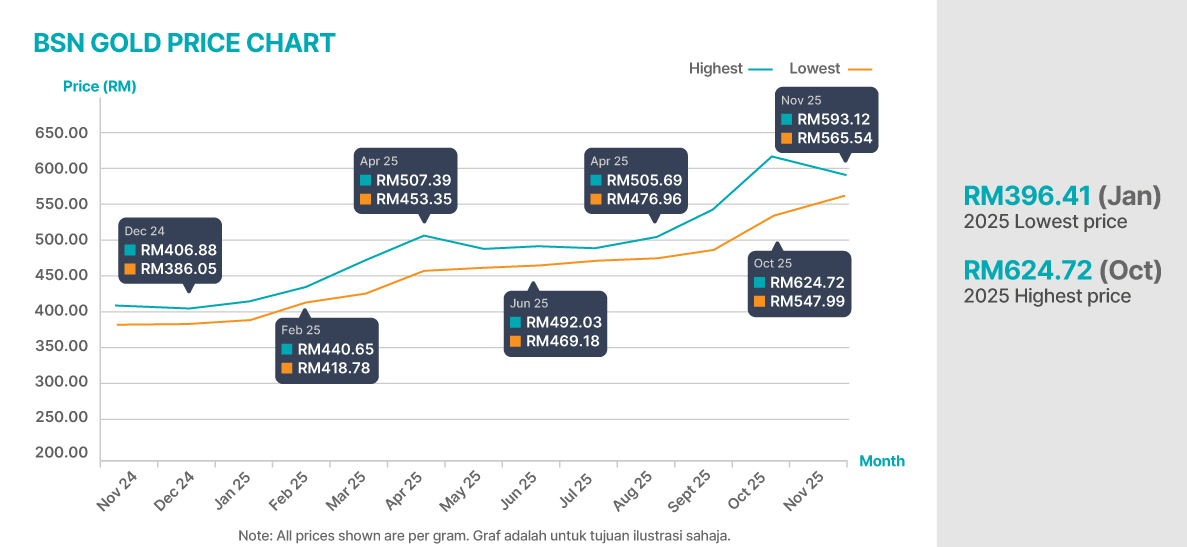
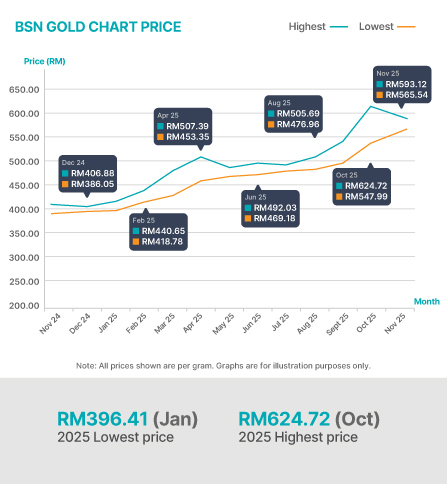
NOTE:
- Gold price at BSN has increased more than 60% since launched in August 2023.
HOW TO PURCHASE?

Over BSN Counter

Wealth Advisor Consultant

myBSN Mobile Apps
TYPES OF TRANSACTIONS

Buy and Sell Gold

Transfer of Gold

Redeem to physical Gold
STEPS TO OPEN A BSN MYGOLD ACCCOUNT-i
| Step 1: | Visit any nearest BSN Branch. |
| Step 2: | Bring along a valid identification document (e.g. Identification Card). |
| Step 3: | Inform the counter staff that you wish to open a BSN MyGold Account-i and submit the required documents. |
| Step 4: | Once your application is approved, sign the account opening form provided. |
| Step 5: | You will receive your new account details once the initial purchase has been made. |
ENJOY THE CONVENIENCE OF GOLD TRADING VIA myBSN MOBILE APP
BUY GOLD
Launch the myBSN Mobile App and log in using your registered credentials username and password.
Launch the myBSN Mobile App and log in using your registered credentials username and password.
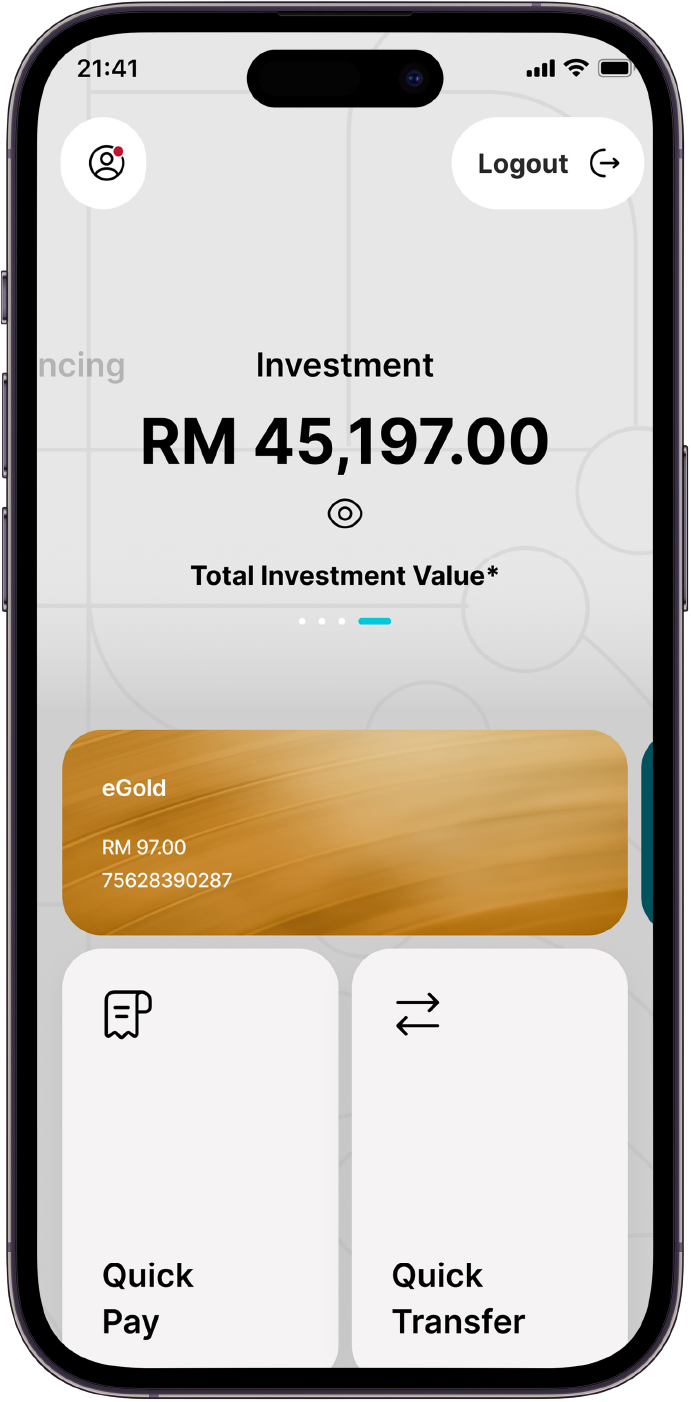
From the main menu, select the tab ‘Investment’. Choose your preferred transaction type: ‘Buy Now’
From the main menu, select the tab ‘Investment’. Choose your preferred transaction type: ‘Buy Now’
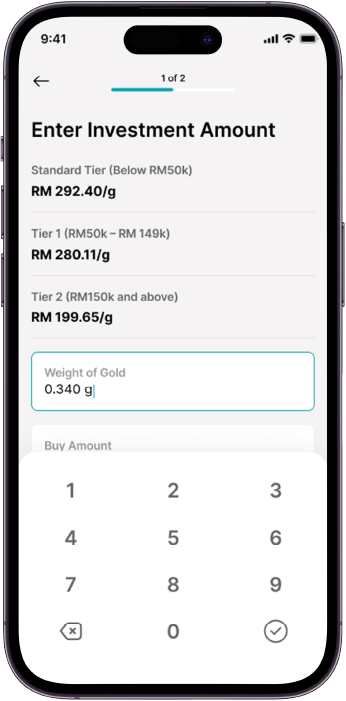
Enter the amount in RM or grams and click ‘Confirm’.
Enter the amount in RM or grams and click ‘Confirm’.
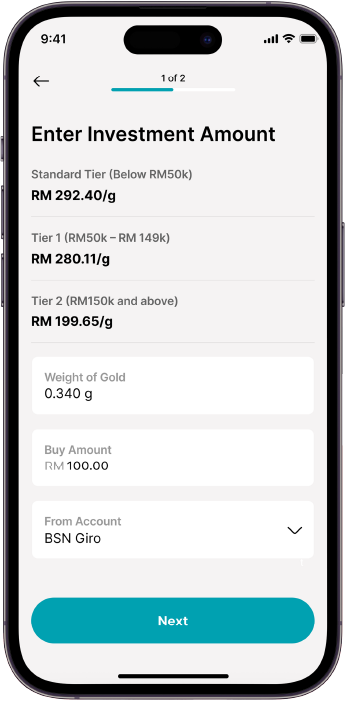
Review the transaction details carefully to ensure accuracy. Once verified, tap ‘Next’ to proceed.
Review the transaction details carefully to ensure accuracy. Once verified, tap ‘Next’ to proceed.
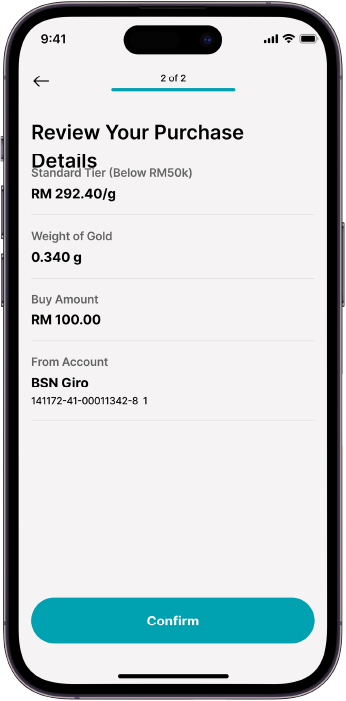
Review the transaction details carefully to ensure accuracy. Once verified, tap Submit to proceed.
Review the transaction details carefully to ensure accuracy. Once verified, tap Submit to proceed.
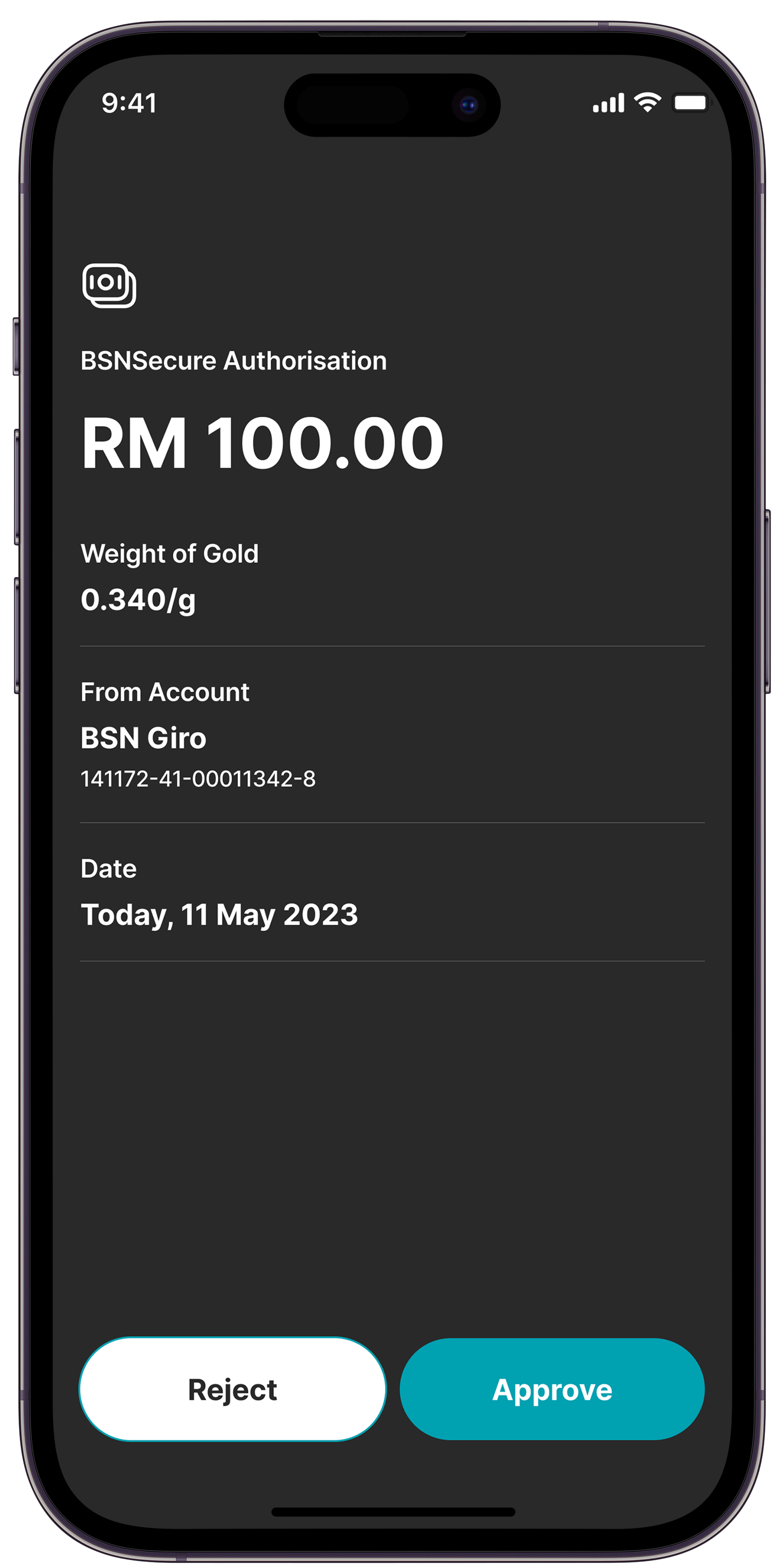
Authenticate the transaction using your registered secure verification method (biometric or push notification approval).
Authenticate the transaction using your registered secure verification method (biometric or push notification approval).
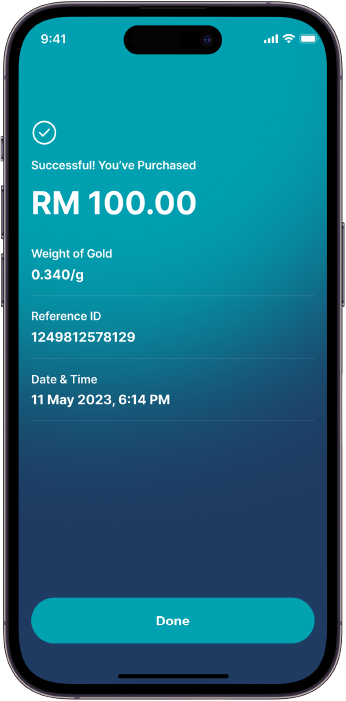
Upon successful authentication, you will be directed to the ‘Acknowledgement Page’. where the transaction status and reference number will be displayed for your records.
Upon successful authentication, you will be directed to the ‘Acknowledgement Page’. where the transaction status and reference number will be displayed for your records.
Launch the myBSN Mobile App and log in using your registered credentials username and password.
Launch the myBSN Mobile App and log in using your registered credentials username and password.
From the main menu, select the tab ‘Investment’. Choose your preferred transaction type: ‘Buy Now’
From the main menu, select the tab ‘Investment’. Choose your preferred transaction type: ‘Buy Now’
Enter the amount in RM or grams and click ‘Confirm’.
Enter the amount in RM or grams and click ‘Confirm’.
Review the transaction details carefully to ensure accuracy. Once verified, tap ‘Next’ to proceed.
Review the transaction details carefully to ensure accuracy. Once verified, tap ‘Next’ to proceed.
Review the transaction details carefully to ensure accuracy. Once verified, tap Submit to proceed.
Review the transaction details carefully to ensure accuracy. Once verified, tap Submit to proceed.
Authenticate the transaction using your registered secure verification method (biometric or push notification approval).
Authenticate the transaction using your registered secure verification method (biometric or push notification approval).
Upon successful authentication, you will be directed to the ‘Acknowledgement Page’. where the transaction status and reference number will be displayed for your records.
Upon successful authentication, you will be directed to the ‘Acknowledgement Page’. where the transaction status and reference number will be displayed for your records.
SELL GOLD
Launch the myBSN Mobile App and log in using your registered credentials username and password.
Launch the myBSN Mobile App and log in using your registered credentials username and password.
From the main menu, select the tab ‘Investment’. Choose your preferred transaction type: ‘Sell Now’
From the main menu, select the tab ‘Investment’. Choose your preferred transaction type: ‘Sell Now’
Enter the amount in RM or grams and click ‘Confirm’.
Enter the amount in RM or grams and click ‘Confirm’.
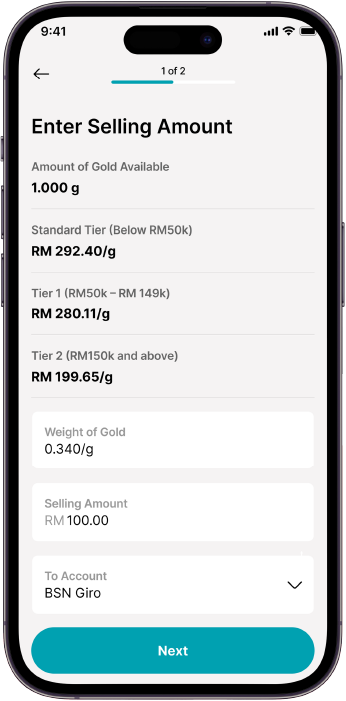
Review the transaction details carefully to ensure accuracy. Once verified, tap ‘Next’ to proceed.
Review the transaction details carefully to ensure accuracy. Once verified, tap ‘Next’ to proceed.
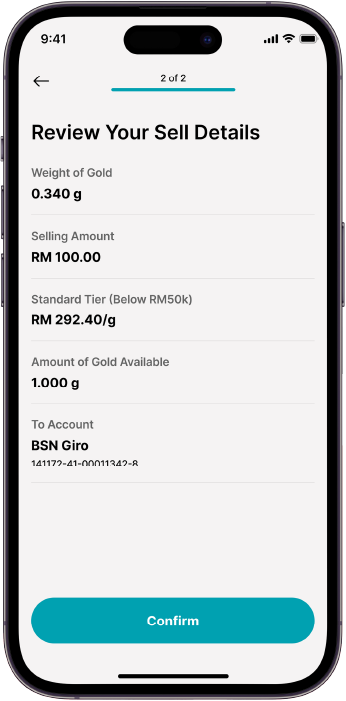
Review the transaction details carefully to ensure accuracy. Once verified, tap Submit to proceed.
Review the transaction details carefully to ensure accuracy. Once verified, tap Submit to proceed.
Authenticate the transaction using your registered secure verification method (biometric or push notification approval).
Authenticate the transaction using your registered secure verification method (biometric or push notification approval).
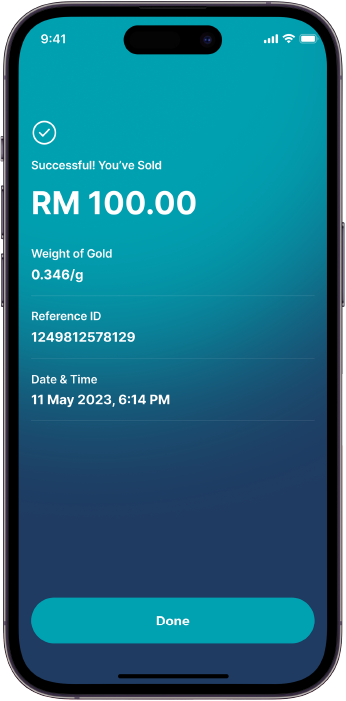
Upon successful authentication, you will be directed to the ‘Acknowledgement Page’. where the transaction status and reference number will be displayed for your records.
Upon successful authentication, you will be directed to the ‘Acknowledgement Page’. where the transaction status and reference number will be displayed for your records.
Launch the myBSN Mobile App and log in using your registered credentials username and password.
Launch the myBSN Mobile App and log in using your registered credentials username and password.
From the main menu, select the tab ‘Investment’. Choose your preferred transaction type: ‘Sell Now’
From the main menu, select the tab ‘Investment’. Choose your preferred transaction type: ‘Sell Now’
Enter the amount in RM or grams and click ‘Confirm’.
Enter the amount in RM or grams and click ‘Confirm’.
Review the transaction details carefully to ensure accuracy. Once verified, tap ‘Next’ to proceed.
Review the transaction details carefully to ensure accuracy. Once verified, tap ‘Next’ to proceed.
Review the transaction details carefully to ensure accuracy. Once verified, tap Submit to proceed.
Review the transaction details carefully to ensure accuracy. Once verified, tap Submit to proceed.
Authenticate the transaction using your registered secure verification method (biometric or push notification approval).
Authenticate the transaction using your registered secure verification method (biometric or push notification approval).
Upon successful authentication, you will be directed to the ‘Acknowledgement Page’. where the transaction status and reference number will be displayed for your records.
Upon successful authentication, you will be directed to the ‘Acknowledgement Page’. where the transaction status and reference number will be displayed for your records.
NOTE:
- For joint accounts and non-individual accounts, all transactions can only be done via over-the-counter at any BSN Branch. Click here to locate your nearest BSN Branch.
UPDATE TRANSACTION LIMIT
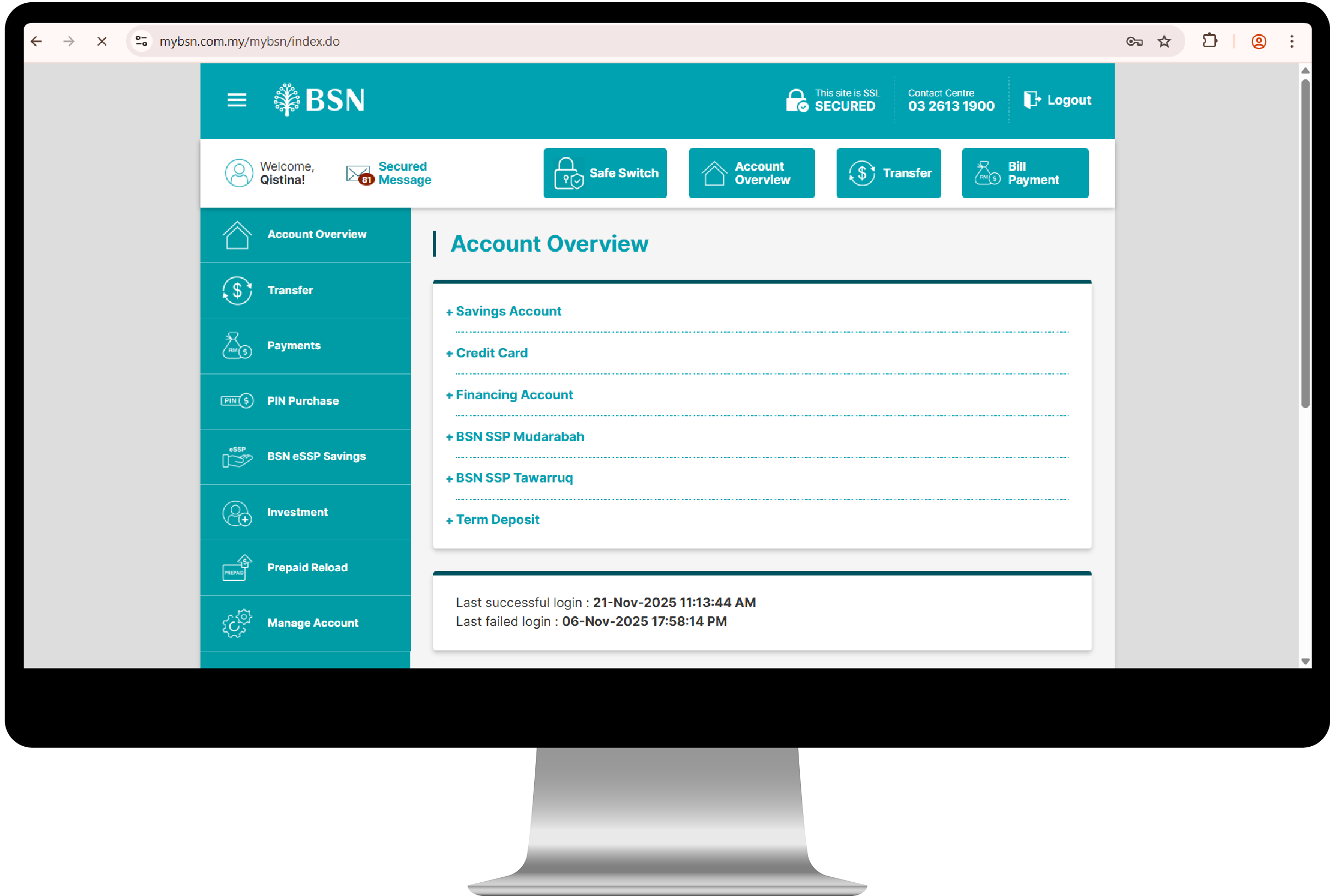
STEP 1
Log in to your BSN account via myBSN Internet Banking using your registered username and password.
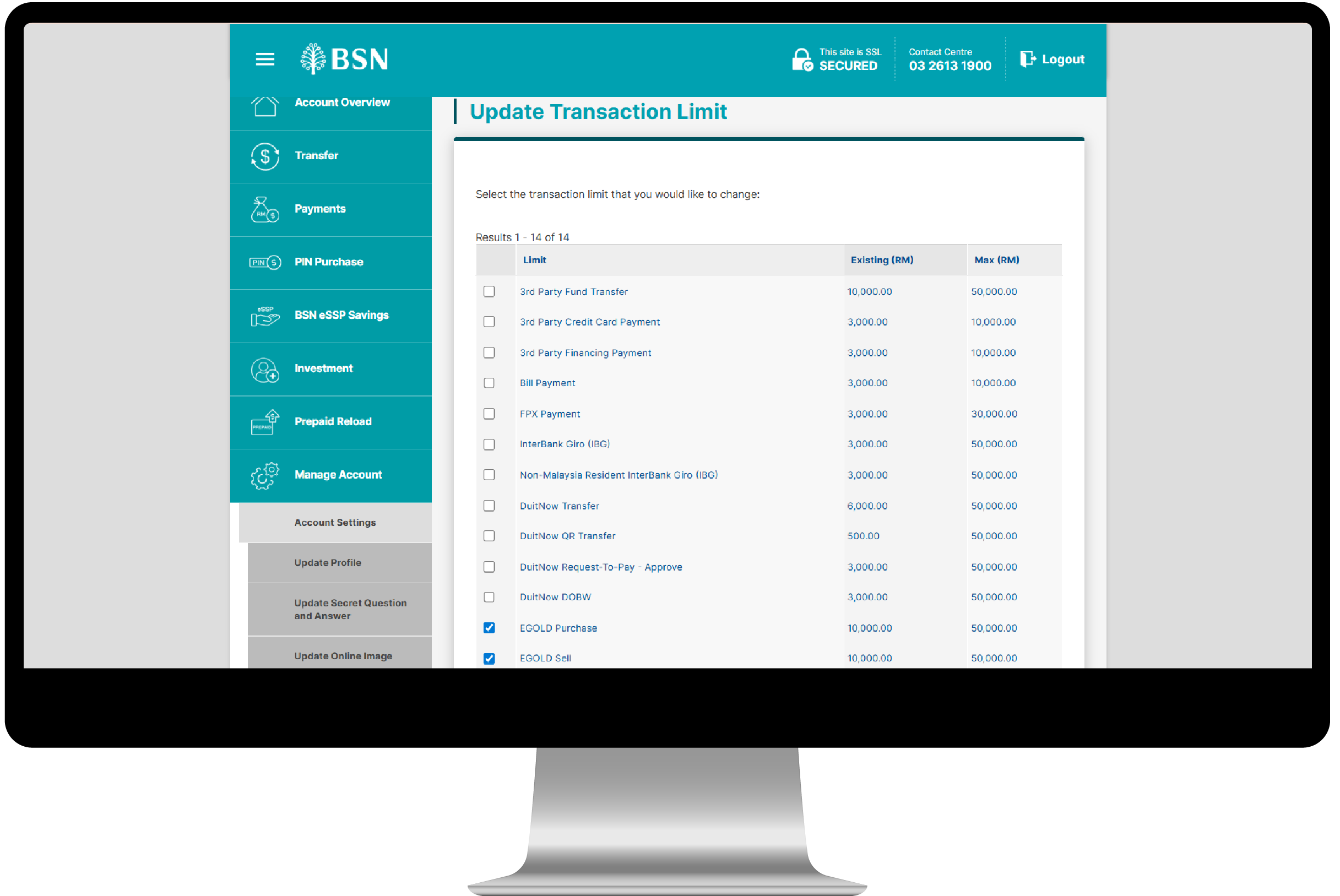
STEP 2
Go to ‘Account Settings’ and select ‘Update Transaction Limit’.
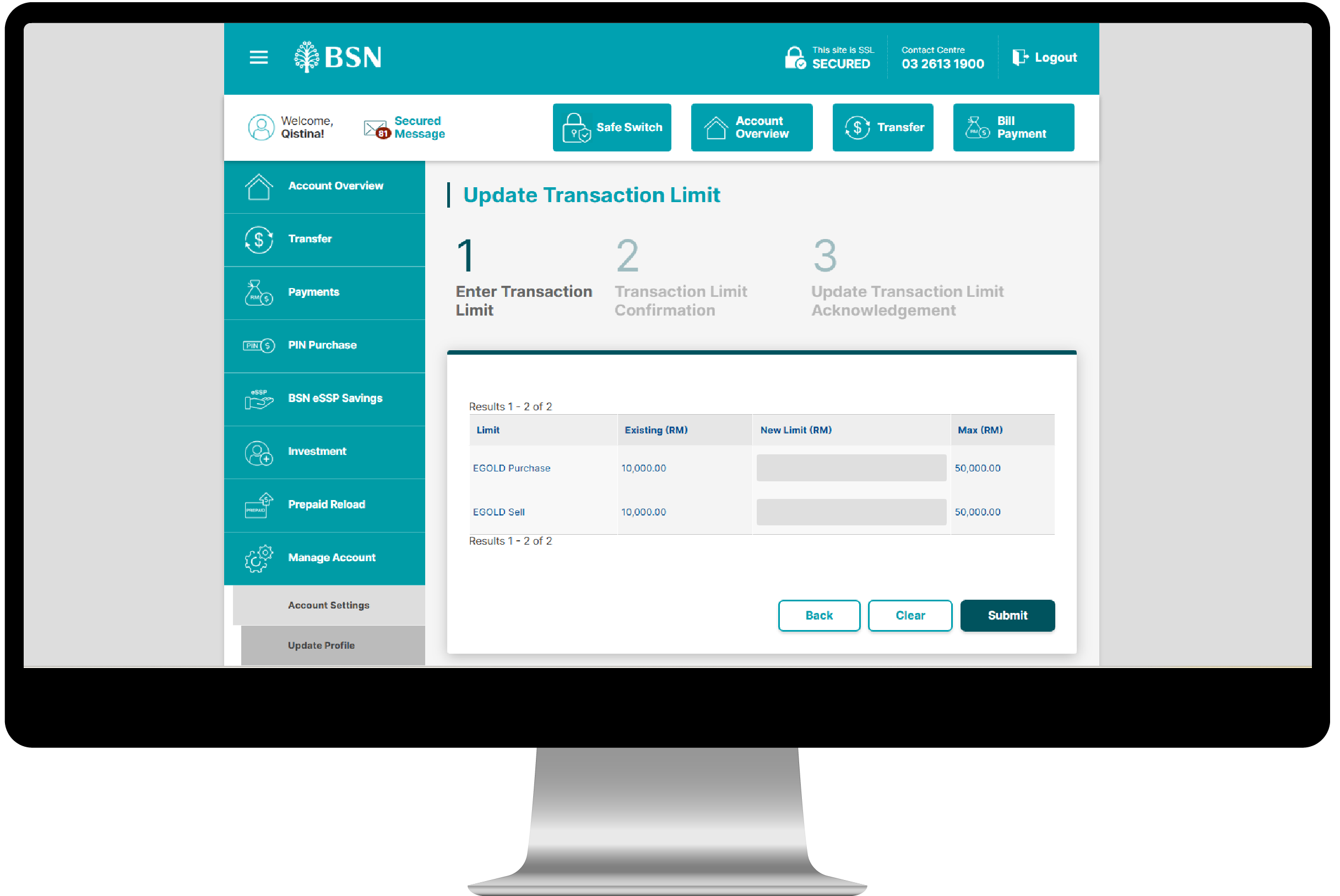
STEP 3
Choose the transaction type you wish to update (e.g., eGOLD Purchase or eGOLD Sell), then click ‘Next’.
STEP 4
Enter your preferred transaction limit in the designated field and click ‘Submit’.
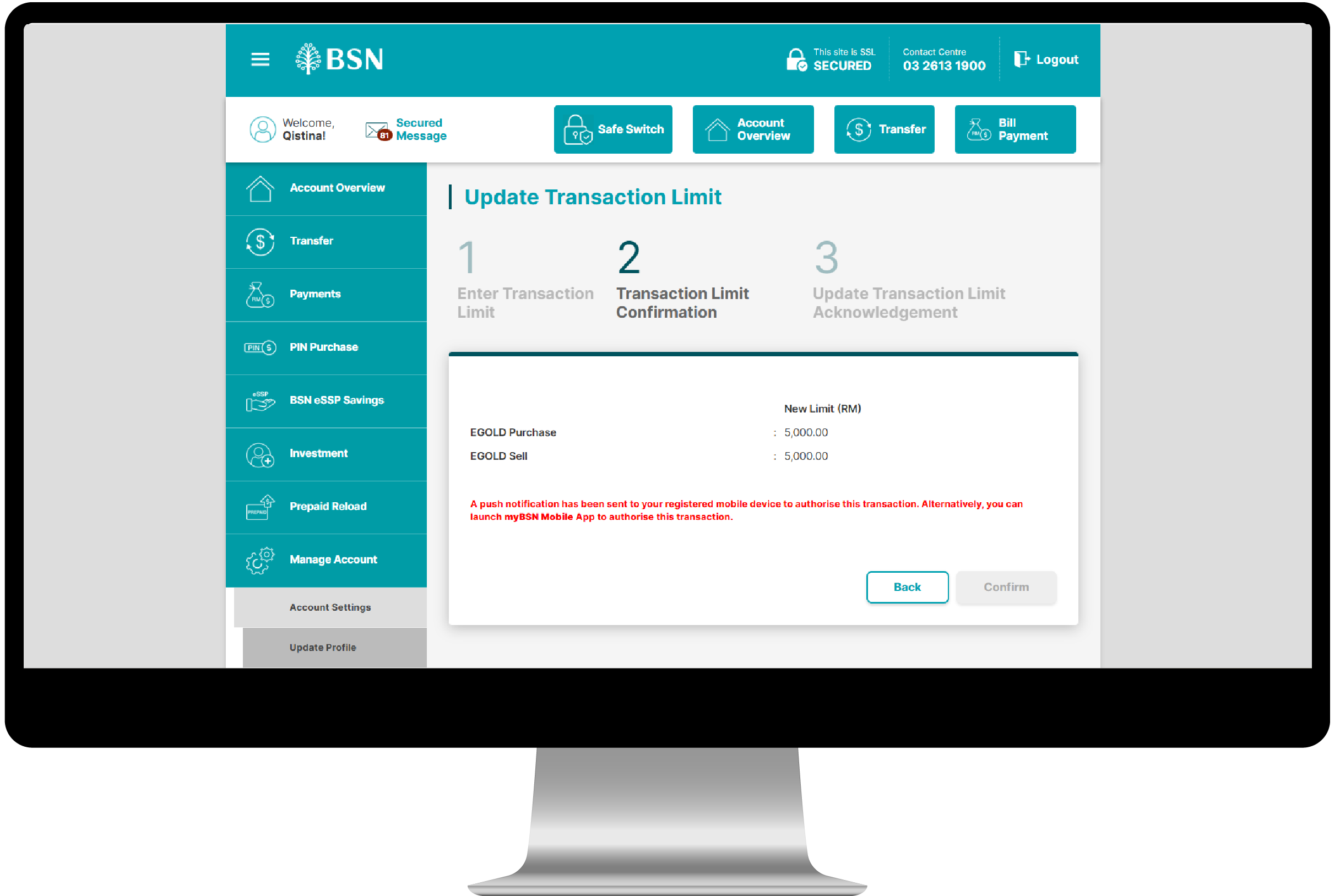
STEP 5
A push notification will be sent to your registered myBSN Mobile App. Kindly approve the request to proceed.
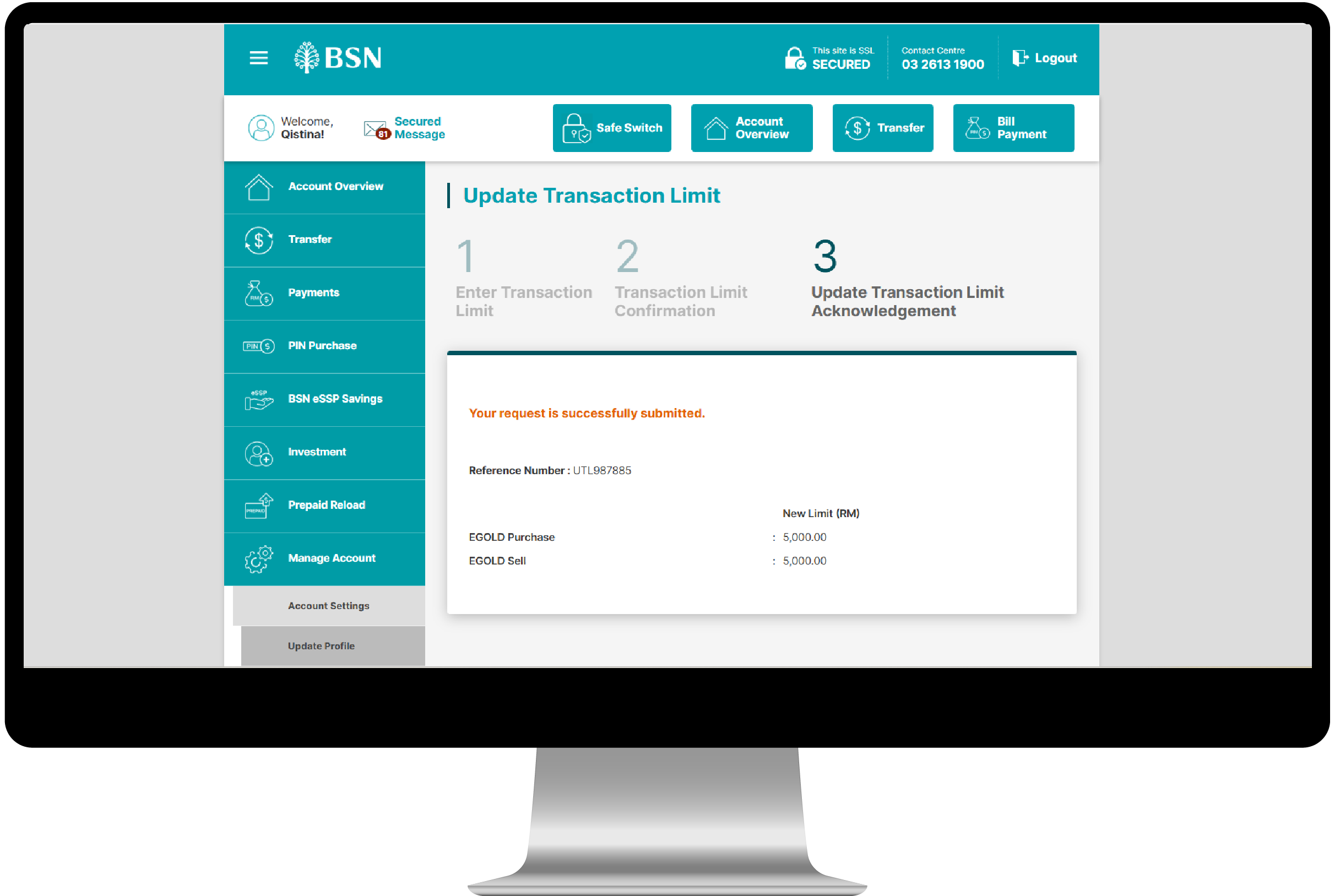
STEP 6
Upon successful approval, you will be directed to the ‘Acknowledgement Page’. Please note that your new transaction limit will take effect after a 12-hour cooling-off period.
GOLD PRICE RATES
| Bank Sell (MYR) | Bank Buy (MYR) |
| 596.79 | 564.80 |
(Price displayed are indicative and subject to change without prior notice. Please call our Contact Centre or visit our nearest branch for the latest gold price or further enquiry.) Effective update: | |
NOTES:
- Terms and Conditions apply.
- View Product Disclosure Sheet.
- View Frequently Asked Questions (FAQ).